
A question?
The answer comes from your knowledge articles, with their sources. If it is not enough, a ticket goes to support with the whole conversation.
AI for ITSM, ESM and CRM
Ecaldima, ZAPP’s ITSM and ESM platform, puts AI where your teams work: in the portal, the ticket, the change, the alert and the customer record. You choose the model, or none at all.
The assistant
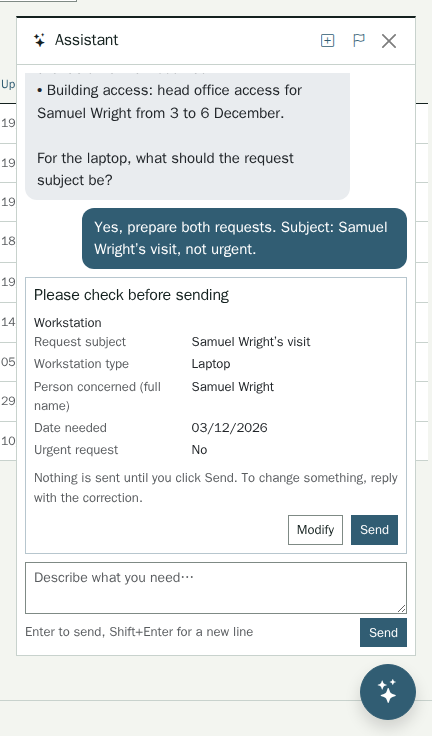
In everyday language, in the portal or in Microsoft Teams. Several needs fit in one sentence: a laptop and building access for the same person.
It searches your catalogue, names the services it found and only asks for what is missing. Names and dates carry over from one request to the next without being asked again.
The summary shows every field. One click on “Send” creates the request, and its number appears in the conversation.
The answer comes from your knowledge articles, with their sources. If it is not enough, a ticket goes to support with the whole conversation.
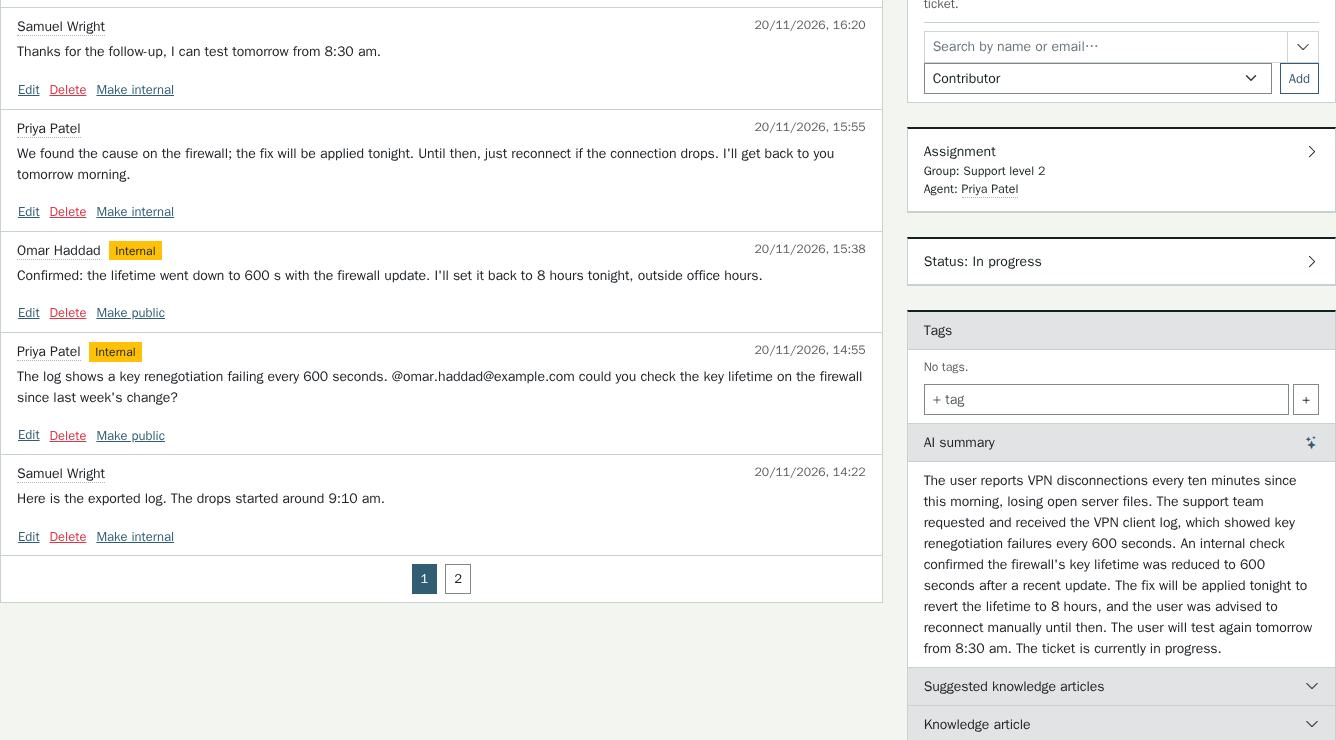
The same assistant finds tickets in everyday language, summarises a thread, replies, and changes a status or an assignment, without leaving the current screen.
Replies can be read aloud, and the whole conversation can be held by voice.
Module by module
In the modules your teams use every day, they get a summary, a suggestion or a first draft when they need it, built from your own data.
The model of your choice
OpenAI, Anthropic, Azure OpenAI, Mistral, Groq, a model hosted on your own infrastructure, or the AI provided by ZAPP. A different model for each function, if you wish.
The instructions used by the assistant, the Service Desk, the knowledge base, changes, problems and releases can be adapted in the administration area, module by module.
Usage is shown by month, function, model and user. A monthly cap, overall or per person, warns you before it is reached and can block calls once it is.
Only data the user can see is sent to the model. The log records who used which function, never the content. Restricted-access areas stay out of the assistant’s reach.
One setting is enough: the AI buttons disappear, and the rest of Ecaldima works exactly the same.
Born with AI
Ecaldima is developed with Claude Code, following Process Built, ZAPP’s method: every need is scoped, and every stage is passed on evidence. That is what lets us deliver fast, and deliver right.
Summary, classification, suggested reply, drafted article: your teams keep their time for what needs judgement.
A market service with your own key, a model on your infrastructure or ZAPP’s, one model per use, changeable at any time.
Usage is tracked by function and by user; a monthly cap can block calls once it is reached.
Only what the user can see is sent to the model, no content is logged, and assistant conversations can be exported and anonymised.
I’m blown away!
We build the demonstration around your situation: your requests, your teams, your tools.