Modules · Service Desk

Every request arrives qualified, with its deadlines already running.

Portal, email, telephone, API, monitoring: the Service Desk brings every request together, qualifies it according to your rules and hands it to the right team. Each ticket carries its deadline, its owner and all of Ecaldima’s context around it.

Request a demonstration Download the sheet

  • Priority calculated from impact and urgency
  • SLAs in working time, alerts before the deadline
  • Monthly indicators and satisfaction

01On arrival

A ticket that already knows where it comes from and how much it matters.

Channel, category, impact and urgency: the priority follows from your rules, not from individual judgement. From the record, one click creates an emergency change, links a problem or declares a major incident, already filled in.
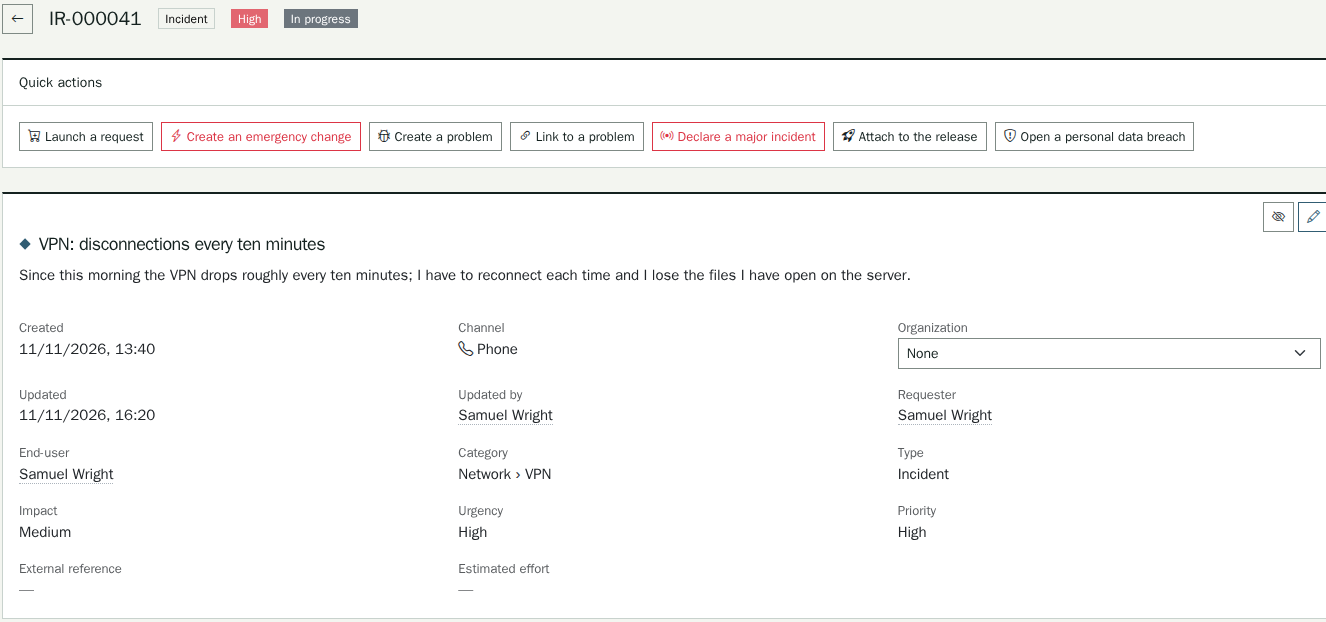
A ticket that already knows where it comes from and how much it matters.

02During handling

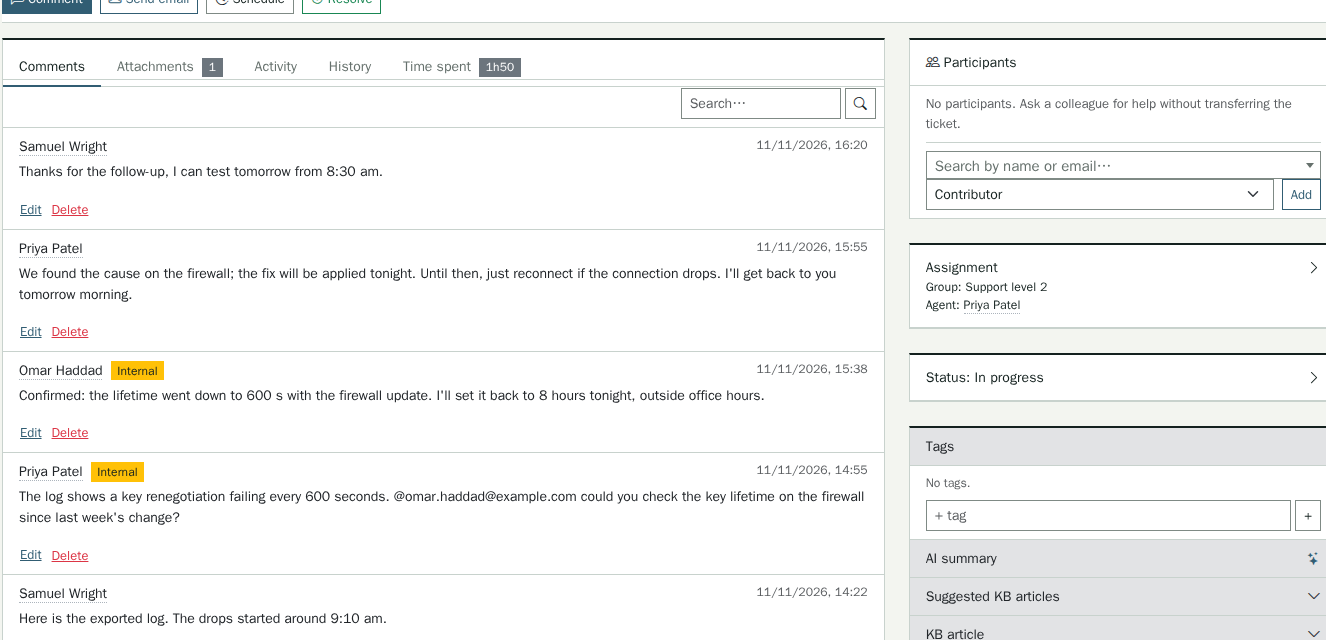
The whole team shares the same context.

Public or internal comments, mentions, attachments and time spent stay on the ticket. A colleague can be brought in without transferring the ticket, and a third party without an account can contribute through a simple link.

The whole team shares the same context.

03For the manager

Your commitments are measured, month after month.

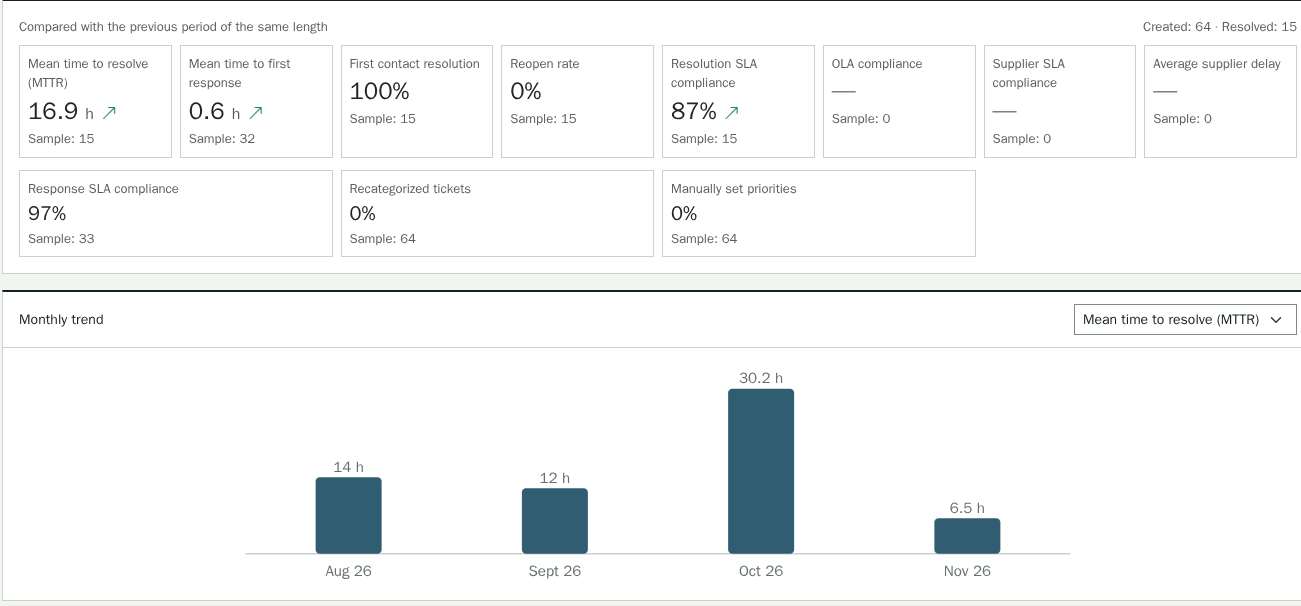
Resolution time, first response, first-contact resolution, reopenings, SLA compliance: each indicator is compared with the previous period, broken down by channel or priority and exported to CSV.

Your commitments are measured, month after month.

Deadlines are counted in working time.

Policies by priority, a working calendar with its time zone, days, hours and breaks, waiting statuses that pause the clock: the team is alerted at the threshold and then at the deadline, without having to open the ticket. Internal commitments and supplier commitments are tracked the same way.

All of Ecaldima is visible from the ticket.

The CMDB items concerned and their dependencies, changes in progress, the closest known errors, related monitoring alerts, the customer account and its opportunities: the agent has the context without leaving the record.

Ecaldima is now on a par with the major American software vendors.

Our partners

Service commitments (SLA)

Each ticket shows at all times where it stands against the response time and resolution time that apply to it. The team is alerted when the threshold is crossed, then at the deadline, without having to open the ticket.

  • Policies by priority, with their working calendar: time zone, days, working hours and breaks.
  • Waiting statuses that suspend the clock and resume it when the ticket leaves them.
  • Internal commitments per group, and follow-up of tickets passed to a supplier against the deadline set in its contract.

Related modules

Functional scope Every detail of the module
  • Reception channelsRequest portal, mailboxes through IMAP or Microsoft Graph with inclusion and exclusion filters, entry by agents, API.
  • QualificationHierarchical categories, statuses, types, an impact × urgency matrix and custom fields.
  • TeamworkAssignment, public or internal comments, attachments, mentions, time spent, a Kanban board and saved views.
  • AutomationRules triggered by an event, a button or a schedule, canned replies, approvals and notifications.
  • Service commitmentsSLAs by priority, internal commitments by group, supplier follow-up and alerts before deadlines.
  • SatisfactionA survey sent on resolution, with tracking of the average score and the response rate.
  • IndicatorsResolution, first response, reopening and SLA compliance, with a monthly trend and CSV export.
  • Wider collaborationLink-based access for a third party without an account, and delegation of assignment to a person or a team.

Integrations

  • Mailboxes through IMAP or Microsoft Graph
  • Monitoring tools, through the Event Management module
  • Your organisation’s identities and agent groups
  • E-mail and in-application notifications
  • AI assistance features, when the AI module is configured

Prerequisites

  • A dedicated mailbox to create tickets by e-mail
  • A working calendar to define for the SLA policies
  • Agent and manager groups to designate

The essentials of this page in PDF, to keep or pass on.

Download the sheet

Want to see this module on your own processes?

We will build the demonstration around your operational reality.

Request a demonstration