From time spent to invoice paid, with nothing keyed in twice.
CRM orders, support contracts, time spent on projects and tickets: everything that needs invoicing arrives in a single queue. Your invoicing software issues the official document; Ecaldima sends it to the customer and tracks it until it is settled.
Payments, overdue invoices and reminders in one place
01On request
Everything to be invoiced arrives in the same place.
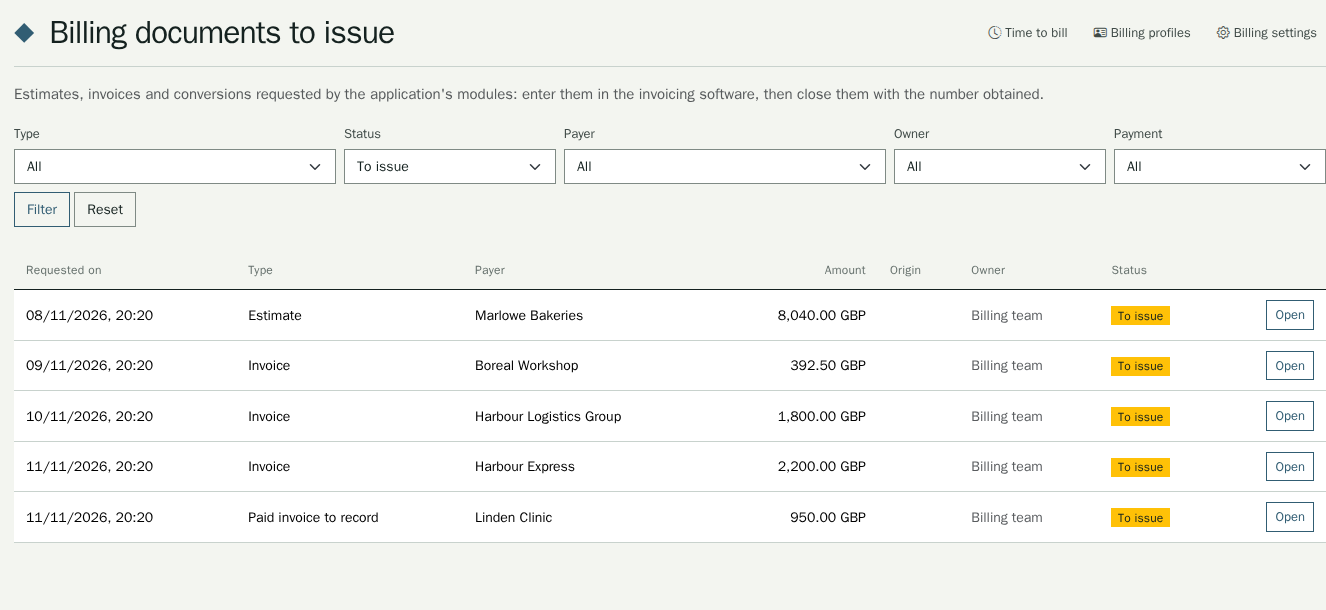
An order instalment, a support pack, time spent or a credit note: the module concerned requests the document once. The billing team finds the payer, the lines, the currency and the amount in the queue, and shares out the work.
02Until payment
An invoice is tracked until it is settled.
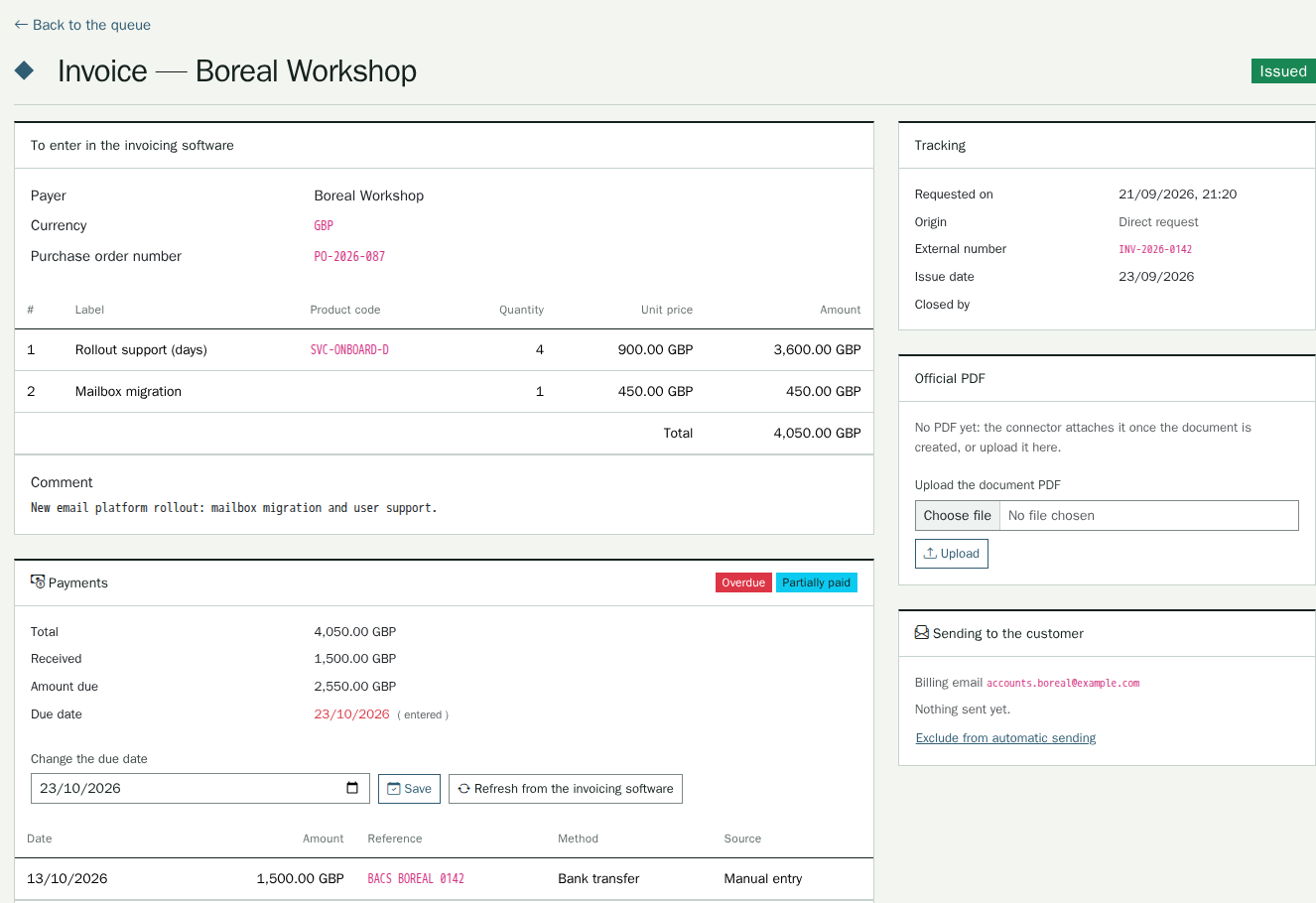
The official PDF from your invoicing software, with its number, goes to the payer’s billing address, in their language. Partial payments, balance due, due date and overdue status stay on the record, and reminders go out in stages.
03For support
A support contract the customer can read for themselves.
Prepaid packs of minutes or time on demand: the time logged on a ticket is deducted from the contract. The customer sees their balance, receives alerts and downloads their usage statement; a ticket without credit is flagged, never blocked.
Your invoicing software remains the reference.
The document given to the customer is the one from your invoicing software, with its official number and legal details. The Holded connector creates it within seconds and brings the PDF back; without a connector, the team enters it in their software and closes it with its number.
Time spent is invoiced only once.
Time spent on a customer’s projects and on tickets outside a contract becomes one invoice per customer and per period. Invoiced time can no longer be changed, and what a support contract covers is never invoiced a second time.
I’m blown away!
Related modules
CRM: customer relationship managementEach order instalment is invoiced on its due day; the order is marked as paid as soon as its invoice is settled, and the account’s Billing panel shows the balance due.
Service DeskTime logged on a ticket is counted against the customer’s support contract; a ticket created without credit is flagged, never blocked.
Project managementTime spent on a customer’s project is invoiced by period; once invoiced, it can no longer be changed.
Functional scope Every detail of the module
Queue of documents to issueQuotes, invoices, invoices already paid, quote-to-invoice conversions and credit notes; filters by type, status, payer and owner; assignment to a member of the billing team.
Holded connectorQuotes, invoices, credit notes and orders created in Holded, CRM quote statuses synchronised both ways, official PDF brought back; a document rejected by Holded stays in the queue with the reason.
Without a connectorThe document record gives everything needed to enter it: payer, lines, currency, total, order number; closing it records the external number and the PDF.
Sending to the customerOfficial PDF sent to the payer’s billing address, in their language; copies and blind copies, choice of sender, configurable document types; a record of every send and resend.
Payments and credit notesPayment status, balance due, partial payments, full or partial credit note with its reason; a payment never exceeds the balance due.
Due dates and remindersDue date read from the connector, entered by hand or calculated from a default term; overdue invoices flagged; automatic reminders by stage of lateness, or an immediate reminder.
Time to invoiceTime on a customer’s projects and on tickets outside any contract, grouped by customer and period, one line per project or ticket; review before the invoice is requested.
Support contractsOne active contract per customer, paid by the customer or by its support partner; prepaid or on-demand mode, hourly rate, counting unit and rounding, alert threshold.
Packs and countingPacks of minutes with their validity, used from the soonest to expire to the latest, and can be reserved for a project; counting per ticket according to the contract’s rounding; billing rules by ticket type.
Credit and alertsTicket flagged as “insufficient credit” but never blocked, with the agent’s decision logged; threshold, zero-balance and upcoming-expiry alerts, without amounts.
Usage statementPDF statement by period and by project, in the reader’s language: packs, movements, counted and uncounted tickets with their reason.
CurrenciesAny currency, chosen by the module requesting the document, never converted; amounts rounded to the currency’s decimals.
Online payment, as an extensionA Stripe building block connects Ecaldima to your Stripe account: payments, subscriptions and Stripe invoices, with their notifications sent back. Your customers’ payment journey is built as an extension, on request.
Integrations
Holded: quotes, invoices, credit notes, orders and official PDFs
CRM: orders, instalments and quotes
Service Desk: time logged on tickets
Project management: time spent on customer projects
Emails sent through SMTP or Microsoft 365
Stripe: online payment, connected as an extension
Prerequisites
The billing profile of each payer, with its billing email address
The members of the billing team
For Holded: a Holded account and its API key, stored in the secrets vault
For time to invoice: an hourly rate and a currency
For online payment: a Stripe account and the extension that carries the payment journey
The essentials of this page in PDF, to keep or pass on.