Modules · Project management

Your projects move at the pace of what is really happening.

Project management organises phases, tasks and milestones, with their deadlines and approvals. Progress is calculated, and a milestone is reached on its own when the change is closed or the release goes live.

Request a demonstration Download the sheet

  • Gantt with dependencies and rescheduling
  • Project progress calculated
  • Portfolio and milestones at risk

The mail migration is 62% complete. The “Users trained” milestone has just turned red.

The final cutover is planned for 18 December. Here is how the project manager sees what the delay affects, and what management knows about it.

In the Gantt chart

Move a task, and Ecaldima shows you what follows.

Phases, tasks, diamond-shaped milestones, dependency arrows: the missed milestone is in red. Drag a bar, and the tasks that depend on it are announced before anything is saved, then moved in one go once you confirm.
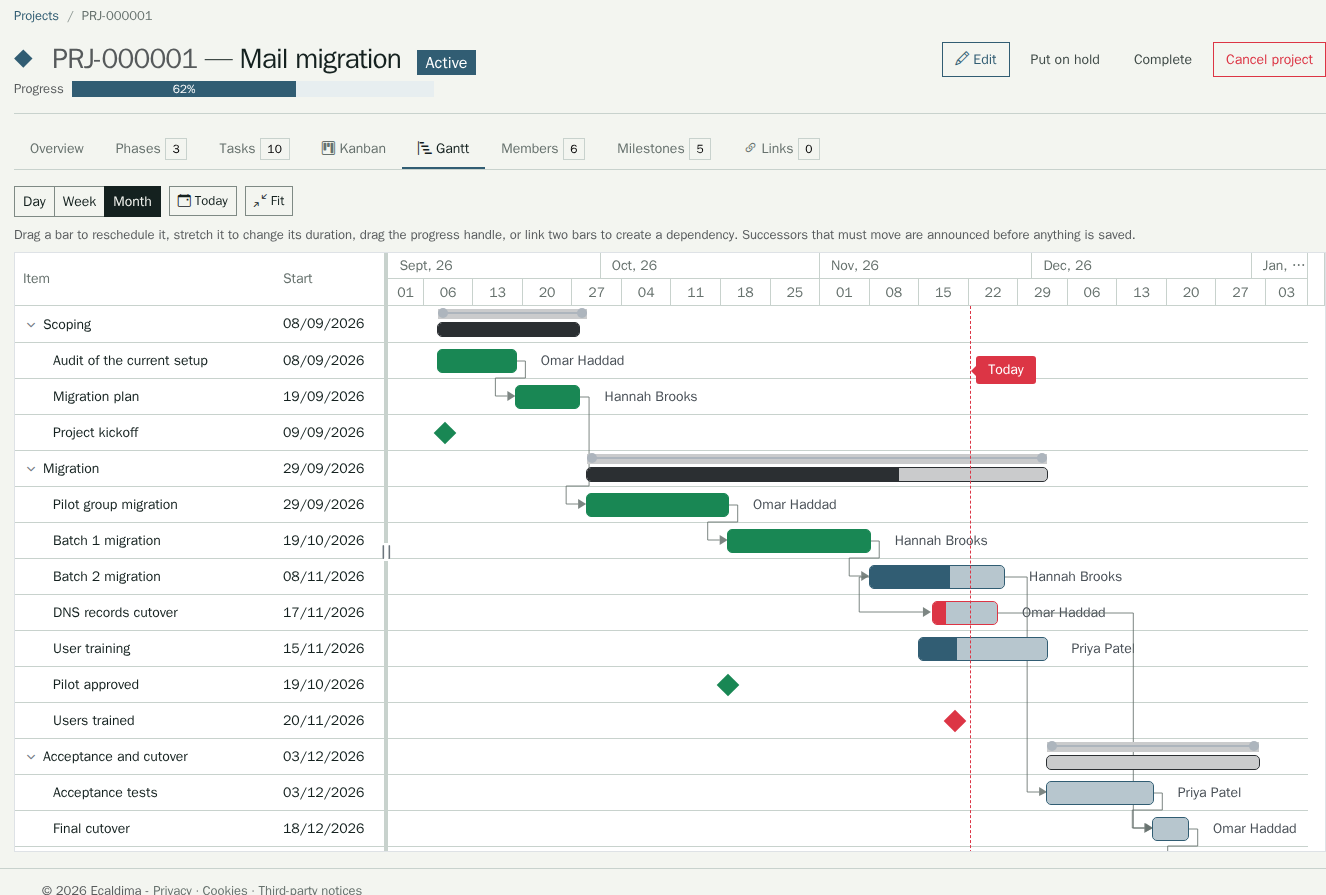
Move a task, and Ecaldima shows you what follows.

For management

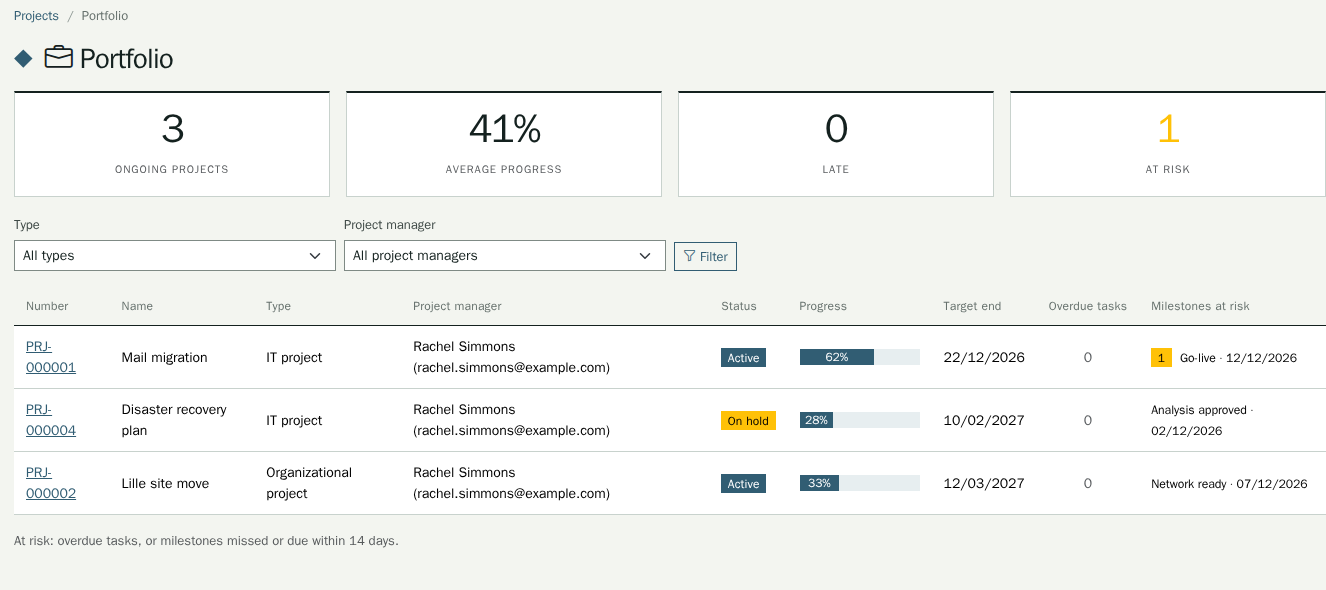
Every project under way, and its milestones at risk.

The portfolio brings together the projects under way: progress, planned end, overdue tasks and milestones at risk, missed or due within 14 days. Project progress is never entered: it is the average of task progress, weighted by estimated effort.

Every project under way, and its milestones at risk.

With the rest of Ecaldima

A milestone that is reached on its own.

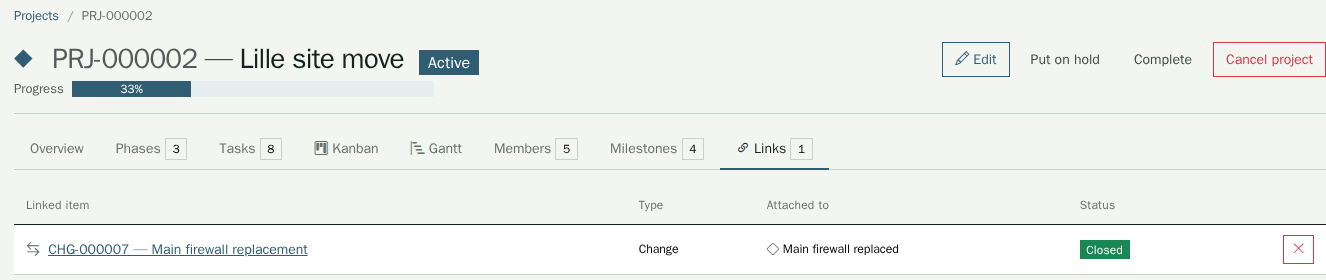
On the Lille site move, change CHG-000007 is closed: the “Main firewall replaced” milestone it backs was marked as achieved on its own. A project or task can also be linked to a release, a CMDB item or a knowledge article.

A milestone that is reached on its own.

Every week

Time spent is entered in one go.

One timesheet per week, one line per task, or an entry from the task itself, set against the estimated effort. Time on a project run for a customer is invoiced with the Billing module, and invoiced time can no longer be changed.

Approvals built in.

The project charter and phase gates are approved by the sponsor or by a process; if the process cannot start, the decision goes back to the sponsor.

A project visible to those who run it.

Project manager, contributor, sponsor, observer: apart from its members and the managers who follow the portfolio, nobody sees the project. Everyone is notified, in their own language, of the tasks assigned to them and their upcoming deadlines; the project manager and sponsor, of milestones reached or missed.

What everyone gets from it

Management

Projects at risk, at a glance.

The portfolio and the dashboard show progress, delays, milestones at risk and each member’s workload, across all projects.

Service manager

A plan that reschedules without a spreadsheet.

The project manager moves a bar, Ecaldima announces the tasks to shift and moves them all once they agree.

IT director

The project follows your changes.

A milestone backed by a change or a release is reached when the change is closed or the release goes live, and their record shows the linked project.

Finance

Time spent becomes an invoice.

Time entered on a project run for a customer goes to billing, once only.

Ecaldima is now on a par with the major American software vendors.

Our partners

Related modules

Functional scope Every detail of the module
  • Roles by projectProject manager, contributor, sponsor, observer; a project is invisible to anyone who is not a member.
  • Phases, tasks and sub-tasksStatuses, priorities, estimated effort, assignee chosen from the members.
  • DependenciesFinish to start, start to start, finish to finish, start to finish, with lag; no loops.
  • KanbanColumns by status, drag and drop, filters, late items flagged.
  • GanttPhases, tasks, milestones and dependency arrows; automatic rescheduling of following tasks after confirmation.
  • Time spentWeekly timesheet and entry from the task, against the estimated effort.
  • ApprovalsCharter and phase gates by the sponsor or by a workflow; a request is never blocked.
  • PortfolioProjects in progress, progress, delays, milestones at risk and load per member.

Integrations

  • Change and release management, for attached milestones
  • CMDB repository and knowledge base, for the links
  • E-mail and in-application notifications, with editable templates
  • Process engine, for approvals

Prerequisites

  • The project types and priorities, to adapt in the settings
  • The groups that create projects and those that view the portfolio

The essentials of this page in PDF, to keep or pass on.

Download the sheet

Want to see this module on your own processes?

We will build the demonstration around your operational reality.

Request a demonstration